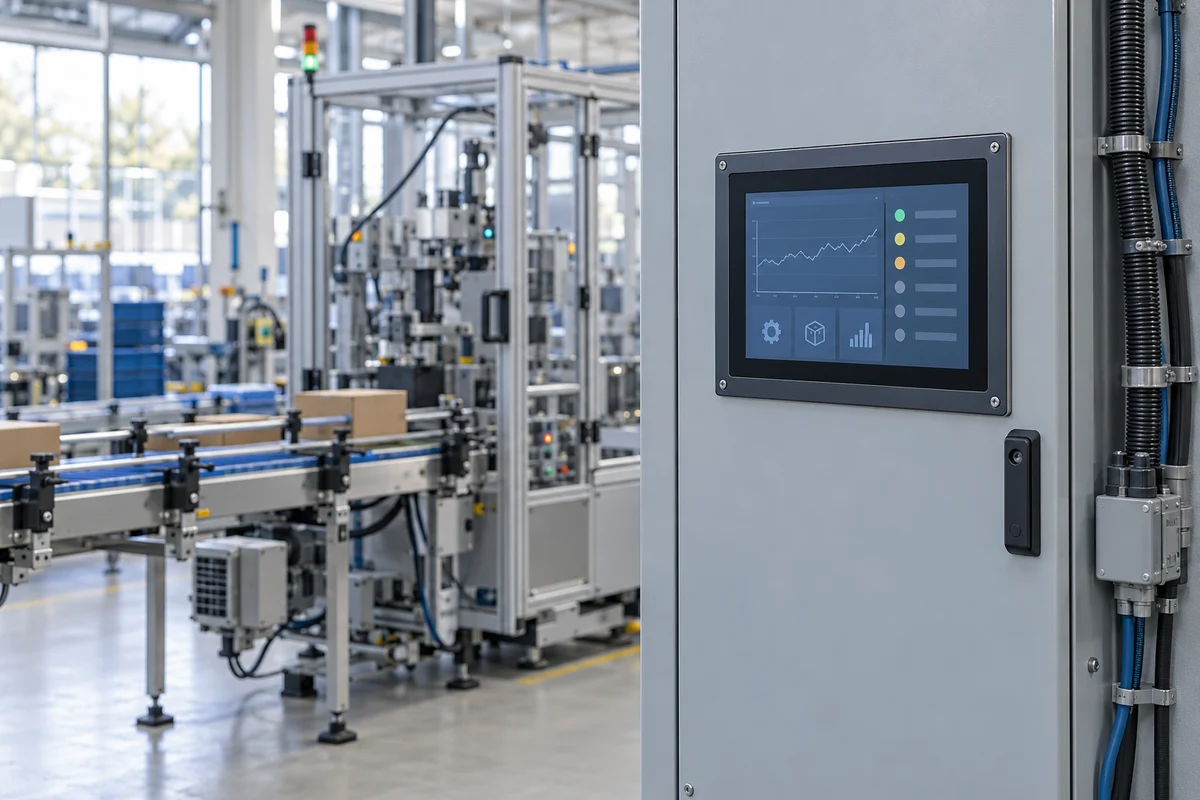
A panel PC puts the operator screen and computer at the machine. This page follows BLIIOT’s ARM-based TPC370 and TPC410 families: which parts form the assembly, which ports share hardware, and what remains unresolved before ordering. Other listed manufacturers offer different platforms; these specifications are not category-wide limits.
An industrial panel PC integrates the operator display and computer in a mounted assembly. This page examines configurable ARM panel computers through BLIIOT’s TPC370 and TPC410 examples; the broader industrial-computer range is covered on page 2849, bare single-board computers on page 9683, and enclosed computers without an integrated screen on page 9680. Dedicated PLC operator panels are covered on page 3992.
CNFX editorial research · Sources checked October 18, 2026 · 4 sources
An industrial SoM does not establish the whole computer’s temperature range
The TPC410 configurator separates industrial SOM410–412 from commercial SOM413–415; TPC370 uses SOM370–372 and SOM373–375 respectively. Their RAM/eMMC pairings are 1/8, 2/16 or 4/32 GB. These are manufacturer configuration choices, not an interchangeable-module standard. [1][2]
The screen and installed boards still need an assembly rating
The TPC370 manual’s overview states −30 to +70 °C operation, but its parameter table also prints −40 to +85 °C / 0 to +70 °C without resolving the complete configuration. Ask for the assembled model’s operating and cold-start limits, load and test conditions; an industrial SoM code alone does not establish them. [4]
A 1 TOPS NPU listing does not establish application throughput
The TPC410 advertises a 1 TOPS NPU. For a vision application, request a trial with the actual model, input resolution and inference pipeline rather than quoting that number as inspections per second. [1]
Family
Industrial compute option
Commercial compute option
TPC410
RK3568J, listed at 2.0 GHz; SoM grade −40 to +85 °C. [1]
RK3568, listed at 2.0 GHz; SoM grade 0 to +70 °C. [1]
TPC370
RK3562J: the configurator says 1.8 GHz, while manual p.6 distinguishes normal 1.2 GHz and overdrive 1.8 GHz. SoM grade −40 to +85 °C. [2][4]
RK3562, listed at 2.0 GHz; SoM grade 0 to +70 °C. [2]
02
The screen, computer and cabinet form a functional assembly
The following is a functional assembly reference, not a purchasing BOM with part numbers or material quantities. The TPC370 manual documents the screen, SoM, carrier interfaces and enclosure; an ordered TPC410 configuration needs its own drawing and parts information. [4]
Assembly item
What it does
What the evidence establishes
Display and touch surface
Shows the operator application and passes touch coordinates to the computer.
TPC370 is the 7-inch variant; the families also list 10.1- and 15.6-inch variants. Capacitive/resistive selection and the ordered screen must be specified. Optical bonding and a particular glass construction are not established here. [2][1]
Compute module and memory
Runs the OS and application; RAM holds working data, eMMC holds the delivered system.
Named SoM grades and RAM/eMMC combinations are published. Ask for the actual module code and image; these ARM options do not describe Intel-based computers in other manufacturers’ ranges. [2]
Carrier / interface assembly
Connects the compute module to Ethernet, USB, serial and selected expansion boards.
X and Y options depend on the carrier configuration. TPC370 DB9 serial connections share X-board channels; connector count is not independent-channel count. [4]
Enclosure and thermal arrangement
Houses the electronics and forms the mounted face.
TPC370 manual p.8 names aluminium alloy plus stainless steel, without allocating grades to individual parts. It does not establish an optional fan or a specified heatsink material for every family. [4]
DC power input
Receives power from the installation’s DC supply.
TPC370 is documented as 12–24 V DC input. An internal AC-to-DC supply is not established; ask separately for any external supply included in delivery. [4]
I/O and wireless modules
Add the selected field signals or wireless connection.
Up to one X and two Y boards in A4; wireless positions are configured separately. Obtain module-specific pinouts and electrical limits. [1]
Mounting and sealing interface
Locates the panel in the cabinet and supports the front seal.
Front IP66 is a manufacturer claim for the stated installation, not proof that all rear connectors are sealed. Obtain the exact cut-out, gasket and fastening drawing; VESA/rack mounting and bracket materials are not universal facts. [1]
For a manufacturing or service BOM, request the delivered assembly revision, replaceable screen/SoM/module identifiers, gasket and mounting hardware list. This reference supplies their roles without inventing supplier part numbers.
03
Count independent signals after checking shared channels
TPC410 / TPC411 / TPC412 identify 7 / 10.1 / 15.6-inch variants. The configurator calls their hardware performance identical; the ordered display, supply demand and assembly environment still require their own specification. [1]
TPC410 base connections
The page lists dual 100 M Ethernet, HDMI, two USB 2.0 connections and configurable serial interfaces. Wireless and field-I/O options require the full ordered code. [1]
TPC370 is a separate interface decision
Its configurator explicitly says the TPC37x family has no HDMI, although the TPC370 manual overview mentions HDMI. Treat external display availability as unresolved until confirmed for the delivered hardware. [2][4]
DB9 does not necessarily add serial buses
TPC370 manual p.20 says COM1 shares X-board ports 1 and 2, and COM2 shares ports 3 and 4. Do not quote two base ports plus four X-board ports as six independent channels. [4]
X0 needs written clarification
Both online configurators call X0 eight GPIO. Manual p.7 describes CAN, RS485, one DI and one DO; pp.9/11 describe CAN, RS485, two DI and two DO. The name X0 therefore does not give a reliable wiring instruction. [2][1][4]
Select signal conditioning, not just a board label
The Y range distinguishes NPN/PNP inputs and outputs, current/voltage analogue boards, RTD/thermocouple boards, relays and PWM. The web Y54 listing says four-wire PT1000, while the manual’s summary says PT100 and its detailed table says PT1000. Confirm sensor type, wiring and electrical limits for the module revision. [1][4]
The configurator observed during this review displayed TPC411-A4-SOM410-X0-Y02-Y01. It identifies the selected family, carrier, SoM and boards; it does not resolve the X0 documentation disagreement or prove an OS option is deliverable. [1]
04
Specify the screen, DC input and mounted panel dimensions
Specify the complete delivered computer, including the screen, mounting and peripherals. The examples below belong to named BLIIOT configurations; unresolved values need a model-specific answer.
Panel datasheet, brightness setting and viewing conditions.
Supply / V DC
TPC370 manual: 12–24 V DC, normal 250 mA at 24 V, maximum 800 mA at 24 V. [4]
External supply, peripherals, inrush, protection and wiring for the complete order.
Weight / kg
No verified assembled-model weight is established by the sources read.
Delivered variant’s weight and cabinet support calculation.
Mounting
TPC370 manual gives an enclosure dimension, but this is not a certified panel cut-out drawing. [4]
Cut-out tolerance, depth, rear clearance, gasket and fastening drawing.
Editorial calculation: assuming the manual’s stated currents apply at a constant 24 V DC input, 24 V × 0.250 A = 6 W and 24 V × 0.800 A = 19.2 W. These are calculated input-power equivalents, not manufacturer-published power ratings or measured power data. They do not size a supply for TPC410, added peripherals or start-up transients. [4]
05
Ask what was tested and how the computer was mounted
The following are manufacturer-published TPC410 levels, not independently verified certification of every configured unit. Obtain the report identifying the model, ports, cables and operating state. [1]
How must the gasket and cabinet protect the rear? Do not describe the whole computer as wash-down sealed.
06
Separate Ubuntu’s calendar from the vendor’s delivered image
BLIIOT advertises Buildroot Linux 5.10 with an RT option and Ubuntu 20.04. Its configurators mark Debian 12 and Android 13 under development, while Android 13 also appears in descriptive text and the TPC370 manual. Ask which image is actually released for the ordered hardware. [1][2][4]
Make the maintenance path part of acceptance
Ask the supplier to demonstrate the application, selected I/O and touch operation on the actual image, then show backup, restoration and an update. Record who addresses vendor-specific kernel and module defects separately from the OS distributor’s security service.
Ubuntu 20.04
Canonical lists standard security maintenance ending May 2025, expanded security maintenance to May 2030 and Legacy add-on coverage to May 2035. Coverage depends on the applicable service and packages. [3]
A fifteen-year headline needs the add-on
Canonical’s extended LTS calendar combines ESM and the Legacy add-on. It is not a promise that every Ubuntu Pro subscription automatically covers every component for fifteen years. [3]
Newer Ubuntu is not an automatic board upgrade
Canonical lists 24.04 standard maintenance through May 2029 and 26.04 through May 2031. The TPC370 manual says it does not guarantee compatibility for system versions other than those it provides. A release-calendar date does not establish a working BLIIOT BSP, display driver or I/O library. [3][4]
Define maintenance responsibilities
Request the delivered OS image, kernel/BSP version, package coverage, vendor driver maintenance, source/SDK access, update method and end date. Docker, Node-RED, Qt, BLRAT and a watchdog listing do not supply those commitments. [1]
07
Commission the installed screen before relying on remote recovery
The TPC370 manual describes display rotation, touch calibration, brightness adjustment, remote access and MicroSD/eMMC recovery. Their menu paths and images belong to that manual’s software, not every panel PC. [4]
Display and touch
Check native resolution, orientation, application scaling and touch coordinates together. The manual’s calibration procedure returns the screen to landscape; test the delivered configuration rather than treating rotation as cosmetic. [4]
Connections and permissions
Reconcile the ordered board code with the supplied pinout before connecting field signals. Check factory accounts and enabled remote access before network deployment; the manual documents default access settings. [4]
Power loss and recovery
Keep a recoverable copy of the approved image and configuration before formatting or reflashing storage. Validate application/log recovery after an agreed power-loss test; a marketing backup feature is not proof that every write survives. [4]
Service access
Request the supplier’s cleaning instructions for the selected touch surface, enclosure and seal, plus the replacement and reassembly procedure. No solvent, cleaning interval or generic fan-maintenance schedule is established here.
08
Copy the panel-PC requirements and the unresolved configuration questions
Paste it into your enquiry below or into an email to a maker, then replace every bracket.
Application and workload: [operator interface / acquisition / vision], software [ ], quantity [ ]
Family and full configuration code: [ ]; SoM [ ], normal/overdrive mode [ ], RAM/eMMC [ ]
Display: size [ ], native resolution/orientation [ ], brightness [ ], touch [ ]; glove/moisture trial [ ]
Field signals: independent RS485/RS232/CAN channels [ ], shared DB9/X connections [ ]; DI/DO and NPN/PNP [ ]
Analogue/sensor boards: range [ ], RTD type/wires [ ], module revision and pinout [ ]; clarify X0/Y54 [ ]
Network and wireless: ports [ ], region/bands [ ], modules/antennas/SIM [ ]; HDMI availability [ ]
Installation: panel cut-out drawing/revision [ ], depth/clearance [ ], gasket/fastening [ ], delivered weight [ ]
Supply: DC range [ ], peripherals [ ], inrush/current [ ], external supply included [ ]
Environment: complete-unit operating/cold-start limits [ ], cabinet conditions/load [ ], front/rear protection [ ]
Evidence: exact-model EMC/environment/protection reports and applicable destination requirements [ ]
Software: released OS image/kernel/BSP [ ], driver/library support [ ], security service/packages/end date [ ]
Acceptance and service: application/I/O/touch test [ ], backup/restore/update demonstration [ ], replaceable parts list [ ]
Delivery destination/date [ ], unresolved documentation items answered in writing [ ]
21 companies list this product among what they make. Company figures are quoted from each
company's own website; every card states where the relationship came from.
BLIIOT
TBC
BLIIOT offers configurable TPC370 and TPC410 ARM panel-computer families. Their SoM, display and X/Y-board options require a complete order code. The TPC370 manual and online configurators disagree on interfaces and limits; request the exact hardware revision, channel map and released OS image.
Amongo’s current category lists industrial panel computers, including panel-mount, VESA/wall-mount, PCAP and Android variants. Its display and box-PC ranges are separate products. Confirm the selected computer’s processor, operating system and mounting drawing rather than assuming every monitor contains a PC.
CESIPC separates FrontOps panel/monitor products, CleanOps hygiene-oriented systems and ComputeOps platforms. Published processor and protection choices vary across the ranges, including Intel and Jetson products. Obtain the exact assembled-model specification and report; a front-protection headline is not whole-unit protection for every option.
Chengdu Zongheng Intelligence Control Technology Co., Ltd.
TBC
IOTRouter’s EC300 page distinguishes box computers from the EC300P touch-panel variant. It publishes an RK3562J ARM platform and configurable communications/software. The multi-model table also covers different computers; request the EC300P screen and port specification instead of transferring another variant’s touch or I/O fields.
Future Robot lists all-in-one touch-panel computers alongside separate box, rack and machine-vision products. The current category establishes a panel-computer offer; it does not establish BLIIOT-compatible modules or software. Specify the quoted processor, OS image, interfaces and cabinet dimensions.
COMPT’s catalogue includes both Intel J4125 and ARM RK3288 panel-computer models. Screen, resolution and connection entries vary by model, and some table labels/units are unclear. Obtain a model-specific datasheet and power/connector drawing instead of interpreting the entire range as one ARM configuration.
Geniatech’s K3-3568 page describes an RK3568 ARM panel computer with Android/Linux choices and configurable display and interface options. Board capability and ordered assembled-unit memory are distinct; request the chosen screen, RAM/eMMC, optional HDMI input and released image together.
Fray’s current site lists fanless industrial panel computers and Intel-based models, with Hystou names in product titles. Ask which entity supplies and manufactures the quoted model, plus its original datasheet and test reports; homepage factory and ruggedness claims are not independently verified here.
Horsent’s industrial panel-PC category lists screen-size variants alongside separate touch-monitor and all-in-one ranges. Confirm the selected computer’s CPU, OS, rear connections and cut-out; monitor availability alone does not establish the corresponding computer configuration.
ICP DAS separates IoT iPC and WES iPPC industrial panel-computer series. Its category mentions Windows-based HMI, acquisition and control applications. Older OS names in the catalogue do not prove a currently maintained delivered image; request the exact model, available OS and update scope.
The saved IESPTECH website redirects to its current iesptech.net catalogue, which separates fanless, waterproof and Android panel computers from displays and other computers. Protection, CPU, thermal limits and mounting must be confirmed for the selected model.
InnoAIOT lists Intel-based panel PCs, front-protected panel-mount variants and separate waterproof systems with sealed connector options. Its industrial monitors form another range. Apply the actual computer’s specification; monitor temperature/power figures and a waterproof-family headline do not describe every panel PC.
Pipo’s industrial panel-PC category includes Android and fanless embedded computer products alongside an open-frame display listing; select a computer model rather than the display-only item.
TOPICON lists PC890 and PC1090 industrial Android panel PCs for vehicle and fixed mounting. Both are labelled under development; PC1090 is also marked as accepting pre-orders. Confirm availability before specifying delivery.
PUSR lists an ARM industrial panel-PC category with integrated touchscreens; its homepage separately links the USR-SH800 industrial all-in-one computer.
Explore company information and manufacturing capabilities, then discuss the scope of your project with a relevant supplier.
Share this page
Compiled and source-reviewed by the CNFX editorial team.
Each manufacturer above links to the page on that company's own website where the product is listed, with the date we checked it. How we source and review
· Page last updated 13 October 2026
Buyer questions
Can I infer the complete panel PC’s temperature range from the industrial SoM?
No. BLIIOT’s documents distinguish compute grades, but the TPC370 overview and parameter table do not consistently describe the whole assembly’s range. Obtain the delivered screen, boards and operating conditions in the supplier’s confirmed assembly specification. [2][4]
Does adding an X-board give extra independent serial ports beyond DB9?
Not automatically. The TPC370 manual says COM1 shares X-board channels 1/2 and COM2 shares 3/4. Request the channel map; do not add connector counts as independent buses. [4]
Does front IP66 make the entire computer suitable for exposed wash-down?
The TPC410 page claims IP66 at the front and IP30 for the whole unit. The cabinet installation and front seal matter; obtain the mounting and test evidence for the ordered model. [1]
Will an Ubuntu Pro service maintain BLIIOT’s custom I/O drivers?
Canonical’s OS support calendar does not establish that commitment. Agree package coverage and separately obtain the supplier’s BSP, kernel and I/O-library maintenance scope, method and end date. [3][4]
Can the TPC370 be ordered with HDMI based on the manual overview?
Its online configurator explicitly says the TPC37x family has no HDMI, while the manual overview mentions it. Confirm the actual hardware in writing; TPC410’s HDMI listing cannot resolve this TPC370 conflict. [2][4]
Sources and what still needs a direct check
Sources checked 2026-10-18. Standards bodies and regulations define the requirements; manufacturer pages show published ranges for those models only. CNFX does not certify products or suppliers.