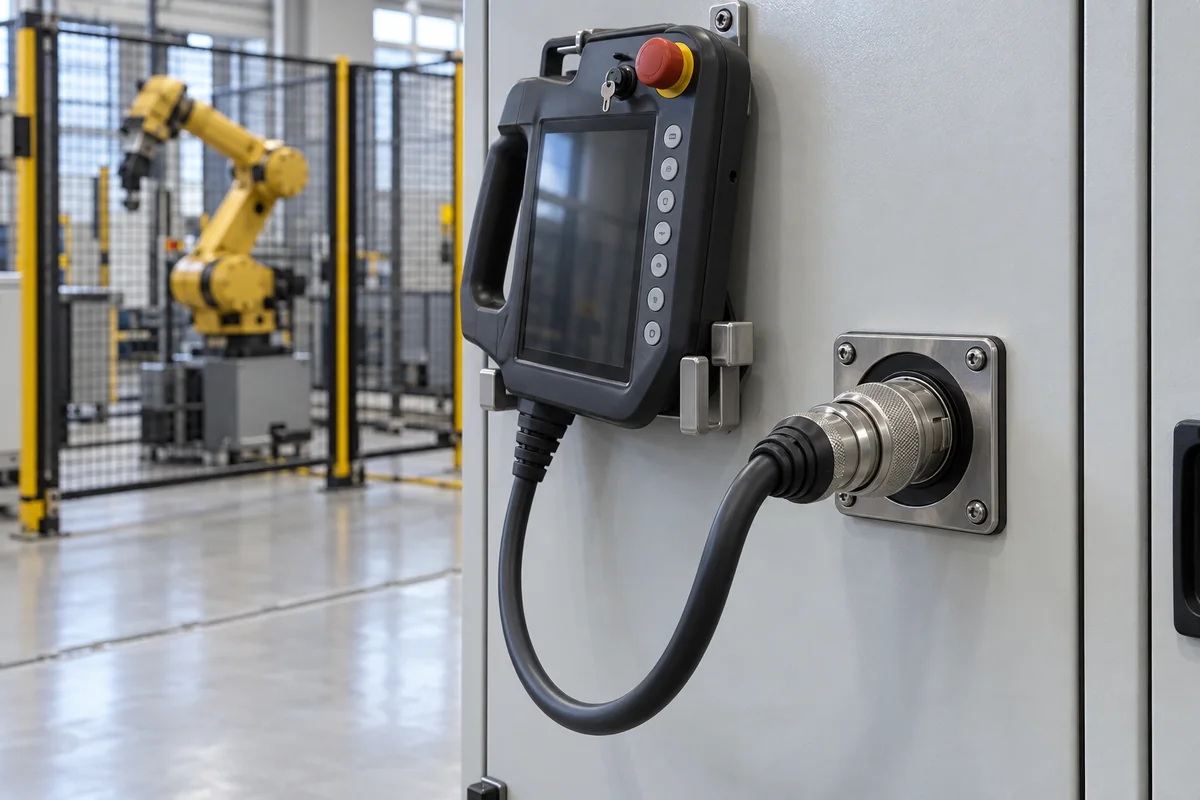
Robot teach pendants and their controller interface · Manual-mode teaching at 250 mm/s or less, 3-position enabling device, emergency stop, cable or wireless link to the controller, display and keys, ANSI/RIA R15.06 and ISO 10218
A teach pendant is the hand-held control station, with a display, jog keys, an emergency stop and an enabling device, that a programmer uses to move an industrial robot and record positions in manual mode; its interface is the cable or wireless link and controller connection that carries commands and safety signals to the robot controller. Ask three things first: which safety functions the pendant and interface must provide, which robot controller and link they must match, and what display, keys, cable length and environmental rating the cell needs.
Teach pendants for industrial robots and their interface to the robot controller: wired and wireless pendants, pendant cables and connectors, and enabling and emergency-stop circuits. Robot controllers, collaborative robot hand-guiding devices and general-purpose HMI panels are outside this page.
CNFX editorial research · Sources checked October 12, 2026 · 4 sources
OSHA's Technical Manual Section IV Chapter 4 lists the teach pendant among the major components of an industrial robot system, with the manipulator and the robot controller. It says programming is done with a teach pendant in manual mode, that robot speed in manual mode is limited to less than 10 in (250 mm) per second, and that the programmer must have control of the robot and associated equipment. [1]
It defines an enabling device as a manually operated device that permits motion only while continuously activated, notes that ANSI/RIA R15.06-2012 requires a 3-position enabling device whose release or compression stops robot motion and associated hazardous equipment, and describes it as held in the centre-ON position and as a device that may be integrated into the teach pendant. Among accident causes it lists a worker programming without a teach pendant with an enabling device, and it calls incorrect activation of the teach pendant a frequent worker error. [1]
Editorial calculation: at the 250 mm/s manual-mode limit, a tool point moves 125 mm during a 0.5 s delay between a worker releasing the enabling device and the robot stopping; ask the supplier for the measured stopping time and distance in manual mode for your robot and payload. [1]
Give the supplier the robot and controller make and model, pendant type (wired or wireless), enabling-device and emergency-stop categories required, cable length and connector, display size, keys and jog method, language, environment (temperature, dust, coolant), IP rating, standards to meet (ANSI/RIA R15.06, ISO 10218), spare cables and quantities.
02
Match the link, controller and environment
The OSHA chapter describes robot controllers as taking inputs from sensors and sending command signals over wired or wireless links, and says ANSI/RIA R15.06-2012 Parts 1 and 2, with ISO 10218-1 and -2, are the safety standards for robots and robot systems, requiring safe operating and maintenance information with the robot and the application. [1]
Editorial note: a pendant and its interface must be matched to the controller's firmware, safety circuits and connector; ask whether a replacement or third-party pendant is validated for the controller, how the enabling and emergency-stop circuits are wired through the interface, and what happens to the safety circuit when a pendant is disconnected or a wireless link is lost.
Compatibility is set by the controller. Yaskawa's Smart Pendant data sheet (March 2026) describes a 10.1-inch touchscreen teach pendant with a 3-mode key switch, emergency stop and enabling switch on an 8-metre cable (extensions available), and lists it for YRC1000 controllers with AR-series, HC-series, GP-series robots up to 80 kg and PL-series up to 190 kg, and for YRC1000micro controllers with GP-series robots up to 12 kg, HC-series, MotoMini and SG-series; some functions, such as macro job editing, are only available through its Classic Interface. [4] Editorial calculation: an 8 m cable lets the operator work about 8 m from the controller cabinet before an extension is needed; compare the cell layout with the cable length and with the wireless option above, and ask which controller and software versions a replacement pendant supports. [4][2]
03
Compare wired and wireless pendant hardware
KEBA's KeTop Basic brochure lists the wired KeTop T70 as a 7-inch, 600 × 1,024-pixel portrait pendant suited to robot teaching, with standard versions carrying a twin-circuit emergency stop and a 3-position enabling switch. It offers pendant cables of 5, 7, 10 and 15 m and a junction box rated IP54 when installed. [3]
Its KeTop T150/T155 safe wireless pendants have a 10.1-inch, 1,280 × 800 multi-touch display and an IP65 housing. They send visualisation data over 2.4 or 5 GHz WLAN and safety data over Bluetooth 4.2 BLE to a base station with discrete relay and semiconductor safety outputs, so any safety controller can be used. RFID pairing works at 10 cm, and optional operating-area monitoring blocks operation where the machine is out of sight. [2]
The wireless pendant's 3-position enabling switch and illuminated emergency stop are each rated SIL 3 to IEC 61508 and Category 4 / PL e to ISO 13849. It runs on 24 V DC, carries a 3,500 mAh battery rated for 2–4 hours, and weighs about 1,450 g with battery; the CB410 base station weighs about 500 g. [2]
Editorial calculation: at 2–4 hours per 3,500 mAh battery, an 8-hour teaching shift needs 2 to 4 batteries or a charging break, so order spare battery packs and the charging station with wireless pendants. [2]
04
Find teach pendant manufacturers
No manufacturer record has been reviewed for this product yet. Send your specification and CNFX will match it against manufacturer records.
05
Trace the pendant and interface components
This is a functional reference built from the sources cited; it is not one maker's design.
Fill the specification fields with values for your robot cell
A teach pendant quotation needs values for your robot cell. The table explains each field, gives published values where a reviewed source states them, and says what to obtain from the supplier.
Explore company information and manufacturing capabilities, then discuss the scope of your project with a relevant supplier.
Share this page
Compiled and source-reviewed by the CNFX editorial team.
Published product pages show what a company offers, not tested performance. Confirm the legal seller, factory and scope for your order. How we source and review
· Page last updated 13 October 2026
Buyer questions
How fast may a robot move while being taught?
OSHA's Technical Manual gives a manual-mode limit of less than 10 in (250 mm) per second. [1]
What enabling device does a teach pendant need?
A 3-position enabling device, required by ANSI/RIA R15.06-2012, that stops motion when released or fully compressed. [1]
Which standards cover teach pendants?
ANSI/RIA R15.06-2012 and ISO 10218-1 and -2 for industrial robots and robot systems. [1]
What safety rating do teach pendant enabling switches carry?
KEBA rates the 3-position enabling switch and emergency stop on its KeTop T150/T155 wireless pendants SIL 3 (IEC 61508) and Category 4 / PL e (ISO 13849). [2]
Is a teach pendant interchangeable between robot controllers?
Check compatibility: one maker lists its 10.1-inch touchscreen pendant only for specific controllers (YRC1000, YRC1000micro) and robot series, on an 8 m cable. [4]
Sources and what still needs a direct check
Sources checked 2026-10-12. OSHA's Technical Manual summarises hazards and the ANSI/RIA and ISO robot safety standards; it is guidance, not a product standard. Requirements for your cell must come from the standards and the robot maker's documentation.