Editorial Technical Reference

User Interface Panel

This page explains how User Interface Panel is classified within Computer, Electronic and Optical Product Manufacturing. Technical values and manufacturer relationships are research references; confirm the current specification and supplier evidence for each order.

Technical Definition & Core Assembly

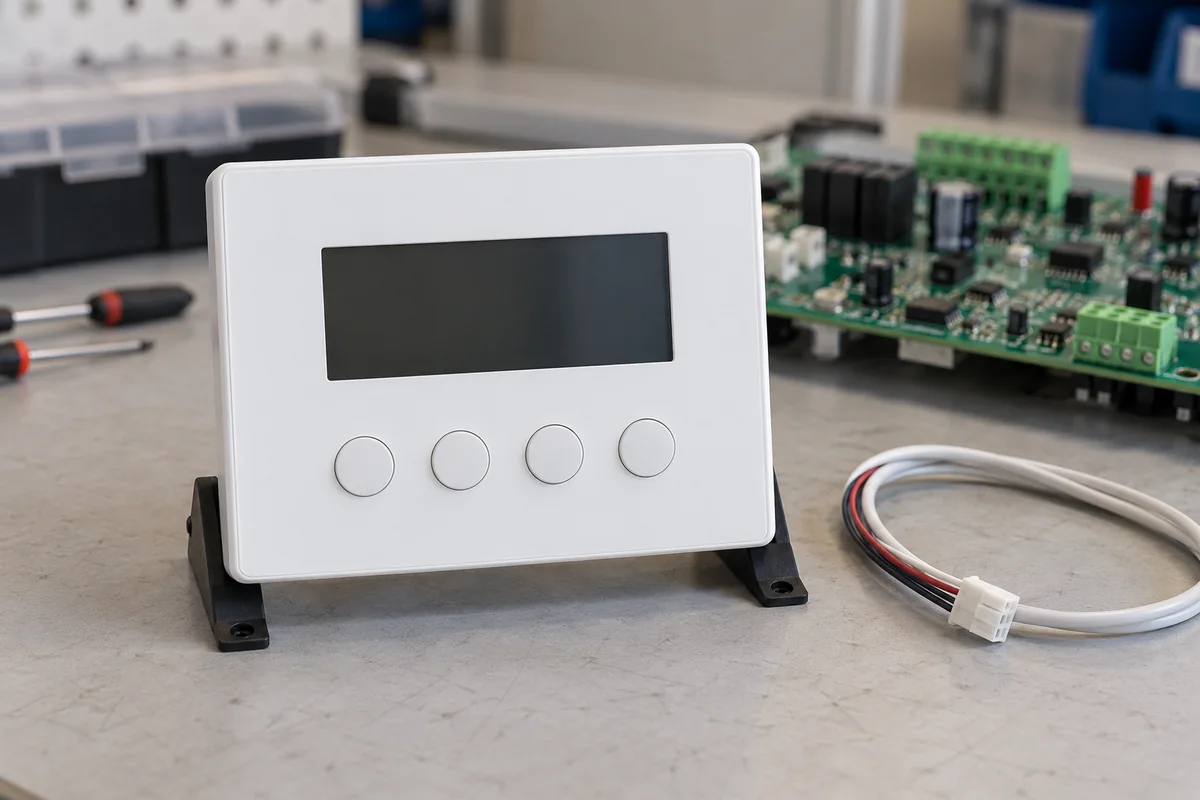
A control interface component that provides operators with visual displays and input mechanisms for monitoring and adjusting system parameters.
Product Specifications

Technical details and manufacturing context for User Interface Panel

Definition
The User Interface Panel is a component used in industrial control systems, serving as the primary human-machine interface. It allows operators to monitor system status, adjust gain levels, configure settings, and receive feedback through visual indicators and control elements. The panel integrates display technologies with input devices to facilitate precise control over amplification parameters. It is typically mounted in an enclosure and connects to the control system via communication interfaces such as RS-232, RS-485, Ethernet, or USB. The panel is available with screen sizes ranging from 7 to 15 inches, resolutions from 800×480 to 1920×1080 pixels, and touch types from resistive to capacitive. It operates within a temperature range of -20 to 60 °C and can be stored at -30 to 70 °C. Relative humidity should be kept between 10% and 90% non-condensing. Ingress protection ratings range from IP54 to IP65, depending on the model. Supply voltage is 24 V DC ±10%, and power consumption varies from 10 to 30 W. Backlight lifetime is typically 30,000 to 50,000 hours. Weight ranges from 1.5 to 5.0 kg, and panel cutout dimensions vary from 192×138 mm to 406×310 mm. Materials used include polycarbonate, aluminum alloy, and glass. The panel is designed for use in computer, electronic, and optical product manufacturing environments. For specific models, verify all parameters and standards with the legal manufacturer or supplier.
Working Principle
The panel receives electrical signals from the gain control system and converts them into visual information on displays. Simultaneously, it accepts operator inputs through buttons, knobs, or touch interfaces. These inputs are processed and transmitted back to the control system to adjust gain parameters in real-time. The display shows system status, gain levels, and configuration menus. The touch interface or physical controls allow operators to change settings. Communication interfaces enable data exchange with the control system. The panel operates within specified environmental limits; exceeding them may cause display failure or short circuits. Regular verification of model-specific parameters is recommended.
Common Materials
Polycarbonate, Aluminum alloy, Glass
Technical Parameters
ParameterTypical rangeNotes & selection driver
Screen Size7–15 inchLarger screens for complex data display
Resolution800×480–1920×1080 pixelsHigher resolution for detailed graphics
Touch TypeResistive–CapacitiveCapacitive for multi-touch and durability
Operating Temperature-20–60 °COutside range may cause display failureIEC 60068-2-1, IEC 60068-2-2
Storage Temperature-30–70 °CFor non-operational periodsIEC 60068-2-1, IEC 60068-2-2
Relative Humidity10–90 %Non-condensing; condensation may cause short circuitIEC 60068-2-78
Ingress ProtectionIP54–IP65IP65 for washdown environmentsIEC 60529
Supply Voltage24 ±10% V DCWide-range input optionalIEC 61131-2
Power Consumption10–30 WDepends on screen size and backlight
Communication InterfaceRS-232, RS-485, Ethernet, USBMultiple protocols supportedIEC 61158
Backlight Lifetime30000–50000 hLED backlight typical
Weight1.5–5.0 kgVaries with size and enclosure
Panel Cutout192×138–406×310 mmMust match enclosure opening

Ranges are indicative industry figures for RFQ preparation, not a supplier commitment. Confirm every value and standard with the legal manufacturer before ordering.

Components / BOM
  • Display Screen
    Visual output of system status, gain levels, and configuration parameters
    Material: Glass with LCD/LED technology
  • Control Buttons Part
    Manual input for adjusting gain settings and navigating menus
    Material: Plastic with conductive contacts
  • Indicator LEDs Part
    Status indication for power, alerts, and operational modes
    Material: Plastic with LED components
  • Mounting Frame
    Structural support and secure installation of the panel
    Material: Aluminum alloy
  • Interface Connector Part
    Electrical connection to the main gain control system
    Material: Copper alloy with plastic housing
  • Knobs Optional
    Rotary control for gain on panels built with physical controls.
  • Touch Interface Optional
    Touch input layer over the display on touch-equipped panels.

Applied To / Applications

This component is essential for the following industrial systems and equipment:

Industrial Ecosystem & Supply Chain Structure

Complementary Systems
Downstream Applications
Specialized Tooling

Application Fit & Sizing Matrix

Operational Limits
pressure: 0 to 1 bar (non-pressurized environment)
other spec: IP65 ingress protection, 0-100% relative humidity (non-condensing)
temperature: -20°C to +70°C
Media Compatibility
✓ Clean air environments ✓ Control rooms with HVAC ✓ Dry industrial atmospheres
Unsuitable: Wet or high-pressure washdown areas with direct water jets
Sizing Data Required
  • Required display size/resolution
  • Number and type of input controls needed
  • Panel mounting dimensions and cutout requirements

Reliability & Engineering Risk Analysis

Failure Mode & Root Cause
Touchscreen Degradation
Cause: Mechanical wear from repeated use, chemical exposure to cleaning agents, or UV damage leading to unresponsive areas, ghost touches, or display fading.
Electrical Connector Failure
Cause: Vibration-induced fretting corrosion at terminal connections, thermal cycling causing solder joint fatigue, or ingress of contaminants leading to intermittent signals or complete loss of communication.
Maintenance Indicators
  • Intermittent or unresponsive touch inputs, flickering display, or abnormal screen artifacts (e.g., lines, discoloration).
  • Audible buzzing or crackling from the panel housing, or abnormal heat felt on the surface during operation.
Engineering Tips
  • Implement regular cleaning with manufacturer-approved, non-abrasive, non-ammonia solutions and use screen protectors to minimize direct wear and chemical damage.
  • Ensure proper mounting to minimize vibration transmission, verify environmental seals are intact, and perform periodic torque checks on electrical connections to prevent loosening.

Indicative industry ranges for design and RFQ preparation. Confirm the exact figures and applicable standard with the manufacturer before specifying.

Compliance & Manufacturing Standards

Applicable Standards
ISO 9241-210:2019 (Ergonomics of human-system interaction) CE Marking (EU safety, health, environmental requirements) IEC 61010-1:2010 (Safety requirements for electrical equipment)

Quoted from the published standard.

Manufacturing Precision
  • Touchscreen alignment: +/-0.5mm
  • Button actuation force: 1.5N +/-0.2N
Quality Inspection
  • IP Rating (Ingress Protection) test
  • EMC (Electromagnetic Compatibility) compliance test

Manufacturers of User Interface Panel

Manufacturer profiles associated with User Interface Panel.

Sourcing User Interface Panel from China?
Tell us your specification and target quantity — we will match it against manufacturer records and come back with the factories that fit.
Request manufacturers We manufacture this

Manufacturer listings support early research and capability understanding. They are not certification, ranking, or transaction guarantees.

Share this page
Technical documentation
Request current drawings, revision history, and a signed specification sheet.
Manufacturing capability
Verify equipment lists, process limits, capacity, and representative production evidence.
Inspection readiness
Confirm test methods, calibrated equipment, sampling plans, and traceable reports.
Supplier transparency
Check the legal entity, factory address, ownership, certifications, and direct contacts.

CNFX does not score or rank suppliers. Buyers must verify all claims and documents with the legal manufacturer before ordering.

Supply Chain Compatible Machinery & Devices

Industrial IoT Gateway

The Industrial IoT Gateway is a ruggedized edge computing device designed for industrial environments.

Explore Specs →
Modular Industrial Edge Computing Device

This modular industrial edge computing device is a ruggedized system designed for deployment in harsh industrial environments to perform real-time data processing, analytics, and control functions at the network edge.

Explore Specs →
Industrial Smart Camera Module

The Industrial Smart Camera Module is a compact, self-contained vision processing unit designed for integration into industrial machinery and production lines.

Explore Specs →
Surface Mount Resistor

Passive electronic component for current limiting and voltage division in circuits

Explore Specs →

Frequently Asked Questions

What are the available screen sizes for this User Interface Panel?

Screen sizes range from 7 to 15 inches, depending on the model. Larger screens are suitable for complex data display.

What communication interfaces does the panel support?

The panel supports RS-232, RS-485, Ethernet, and USB interfaces, allowing integration with various control systems.

What is the operating temperature range?

The operating temperature range is -20 to 60 °C. Exceeding this range may cause display failure.

What ingress protection ratings are available?

Ingress protection ratings range from IP54 to IP65. IP65 is suitable for washdown environments.

Data Basis

Editorial classification, named public sources where available, and source-reviewed manufacturer records.

Preliminary Technical Classification
This page supports structured research, RFQ preparation, and supplier evaluation. It does not replace buyer-led supplier qualification, standards review, or technical approval.
Buyer enquiry

Request manufacturing insight for User Interface Panel

Ask for use case, specification boundaries, supplier type, and RFQ preparation information for this product.

Where it goes
Straight to the CNFX editorial desk, and to the manufacturer if this product is linked to a claimed profile. Nothing is broadcast to a supplier list.
Your details stay here
We do not sell or rent enquiry data, and we do not add you to a mailing list. Used only to answer this request.
No commission, no middleman
CNFX is a directory. We take no cut of any order and never negotiate on a supplier's behalf.
What we don't claim
A listing is not an endorsement. Qualify every supplier and verify every figure yourself before ordering.

Your business information is used only to process this request.

Thank you! Your message has been sent. We'll respond within 1–3 business days.
Sorry, we couldn't send your message. Please try again, or email us at [email protected].

Need to Manufacture User Interface Panel?

Compare manufacturer profiles with relevant product and process capability.

Previous Product
XY Positioning Stage
Last Product
Get QuotesChat