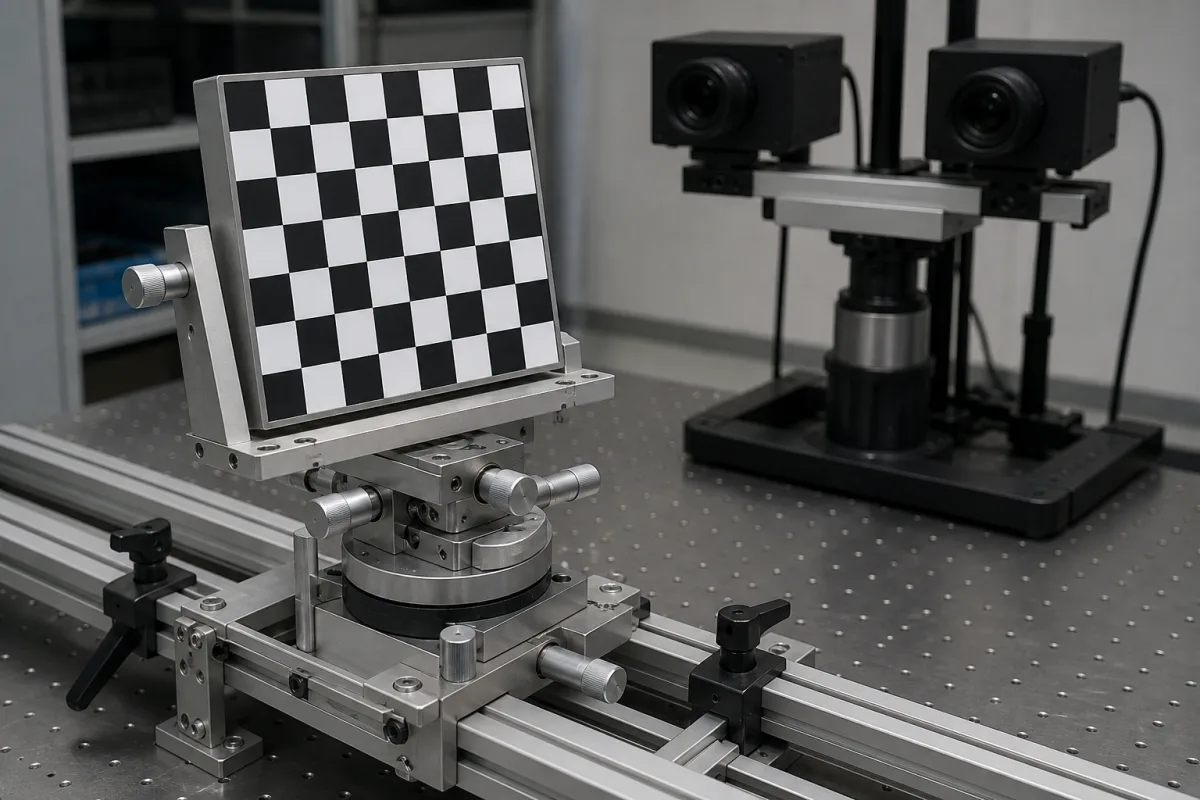
Stereo-vision calibration — target support and pose adjustment
A useful target fixture supports the calibration board securely and lets it reach the positions required by the camera procedure. Specify the plate it holds, the clear view of the pattern and the way the adjustment is locked for image capture.
Passive mechanical holders for checkerboard, dot-grid and similar calibration plates used with stereo camera rigs. The target pattern, camera mounting hardware and calibration software are separate parts of the setup; robot hand-eye work introduces an additional reference-frame requirement.
Hold the board still without covering the features the cameras need
The iDICs good-practice guide recommends a rigid holder to keep a calibration target stationary during image acquisition. It describes translation/rotation stages or an adjustable, lockable ball joint for changing the target pose between images. This guidance is written for digital image correlation setups. [1]
Check the loaded holder at the ends of the required adjustment range. Agree how plate movement during capture and repeatability after repositioning will be measured.
Specify the mount material, total mass, attachment drawing and finish for the actual handling and lighting conditions. Keep the target substrate’s geometric quality separate from the holder’s support-face specification.
Fixture element
Detail to confirm with the target installed
Support bracket
Board size, mass and centre-of-gravity offset; support arrangement and available clearance through the intended poses.
Target clamp
Plate thickness, permitted contact areas, jaw opening and unobstructed view of the pattern from each camera.
Adjustment and locks
Translation/rotation directions, required travel, locking sequence and stability after tightening.
Base attachment
Bench, frame, tripod or robot interface. If magnetic attachment is ordered, specify the contact surface, load direction and retention requirement.
02
Let the chosen camera procedure determine the reachable poses
Basler’s rc_visard instructions require the calibration grid to be fully visible in both camera images and held very still for stereo calibration. Its guided workflow uses different grid positions; its camera and stereo calibration stages have their own pose requirements. [2]
Lay out the holder with the actual camera baseline, lenses, working volume and target dimensions. Check that clamps, adjustment knobs and support arms stay outside the required pattern view as the plate moves.
Run through the intended capture sequence with the fixture before accepting it. Review image sharpness, feature detection, lighting and reflections at the required poses; then check that each lock can be reached without moving the camera rig.
State the operating and storage environment, including temperature, humidity and contamination exposure. Any environmental-protection claim should identify the part and test conditions to which it applies.
Basler warns that incorrect grid dimensions or an inaccurate custom grid can corrupt calibration. Supply the correct target geometry and units with the calibration record, rather than deriving them from the holder’s adjustment scale. [2]
03
Secure the target to the reference frame required by the calibration task
Basler distinguishes robot-mounted and static-camera hand-eye setups. With a robot-mounted camera, the grid stays fixed to the external reference; with a static camera, the grid is attached securely to the robot. The grid’s attachment to that selected reference must remain stable through the calibration sequence. [3]
Mark the fixed interfaces and the joints that may be adjusted on the fixture drawing. Include the locking and reattachment procedure in the handover, with any alignment features or reference marks needed by the application.
Basler’s hand-eye instructions identify additional axis and offset information for robots with constrained rotation. Confirm the robot kinematics and the chosen software’s input requirements before specifying absolute-position readouts or a fixture positioning tolerance. [3]
Record the mechanical acceptance method and the camera-calibration result separately. Basler’s camera workflow reports a reprojection error; that result also depends on the target, images and calibration procedure. [2]
04
Calibration target fixture specification
Paste it into your enquiry below or into an email to a maker, then replace every bracket.
Calibration workflow: [stereo-camera procedure, DIC or robot hand-eye task]
Target: [pattern, plate dimensions, thickness, mass and geometry data]
Viewing arrangement: [camera pair, lenses, working volume and required poses]
Clamping: [permitted edge contacts and clear pattern aperture]
Adjustment: [axes, travel, locks and access with the target installed]
Base/reference frame: [bench/frame/tripod/robot interface; magnetic attachment if ordered]
Mechanical acceptance: [load/overhang, movement during capture, return repeatability and support-face requirements]
Environment and delivery: [temperature/humidity, materials, finish, protection claims, fixture mass and drawings]
Explore company information and manufacturing capabilities, then discuss the scope of your project with a relevant supplier.
Share this page
Compiled and source-reviewed by the CNFX editorial team.
Each manufacturer above links to the page on that company's own website where the product is listed, with the date we checked it. How we source and review
· Page last updated 23 October 2026
Buyer questions
Should the target remain in one fixed pose throughout camera calibration?
Follow the selected camera workflow. The iDICs guide recommends keeping the target still during acquisition while allowing it to be moved and rotated between images. Basler’s camera procedure likewise specifies a sequence of target positions. [1][2]
Does a mount’s positioning tolerance specify the camera-calibration accuracy?
Specify and verify the fixture’s mechanical behaviour under its actual load. Evaluate the camera-calibration result separately using the intended target and image sequence; Basler reports a reprojection error for its camera-calibration result. [2]
Sources and evidence scope
Sources checked 2026-10-23T09:20:31+08:00. iDICs addresses target holders in DIC calibration practice. Basler documents stereo-camera and robot hand-eye workflows; those requirements belong to the specified procedure rather than to every fixture.